Removals software for small operators
Quote faster, stay organised, and win more booked jobs without running your company from spreadsheets and WhatsApp.
Why smaller removals companies need a proper system
You probably have enough work. The problem is the admin. Leads live in your phone, quotes sit in your email, dates are scribbled into a diary, and follow-up depends on memory.
- Good leads slip through because nobody followed up
- Quotes take too long to send, so customers book elsewhere
- Deposits are chased manually, or not at all
- Move-day details are scattered across texts, notes, and memory
That is fine for a while, but it gets expensive. Time lost formatting quotes, time lost chasing deposits, time wasted hunting for who said what in WhatsApp. That is time that could be doing paying jobs, or giving you a sensible evening.
Why this quietly costs you money
Every missed follow-up, slow quote, and messy handover creates leakage. Smaller operators do not usually need more leads first: they need less friction between enquiry and booking.
How the real workflow should look
One flow: enquiry to booked job with a deposit in the bank.
Lead
A new enquiry lands in one place, with no more hunting through texts.
Quote
Build a branded, itemised quote in minutes and send it online.
Deposit
The customer accepts and pays a deposit there and then.
Job
The accepted quote becomes a scheduled job with crew details attached.
See it in action
About 8½ minutes. Real screens. No filler.
Quote faster and look professional
Branded, clear quotes with optional extras make it easy for customers to accept.
Your quote becomes a sales tool, not a plain-text message.
Collect deposits at the point of decision
Deposits convert indecision into bookings and protect your diary.
The highest-intent moment is right after the customer sees the quote.
See every lead at-a-glance
A simple pipeline shows who needs chasing and what stage each enquiry is at.
Follow-up becomes visible instead of living in memory.
Calendar and job handover in one view
Surveys, move dates and crew notes linked to the job avoid double-bookings and chaos.
The handover is cleaner because the operations detail is attached to the booking.
Key takeaways
A single system that links leads, quotes, deposits and job handover lets your business win more bookings while reducing evening admin. For smaller operators, simplicity and workflow alignment are the real competitive advantages.
Video version
If you want the dedicated watch page for sharing, indexing, or replaying later, use the standalone video-first page rather than this broader overview.
Proof on the screen
The workflow is not theoretical. These screens show the exact moments where professionalism and speed improve conversion.
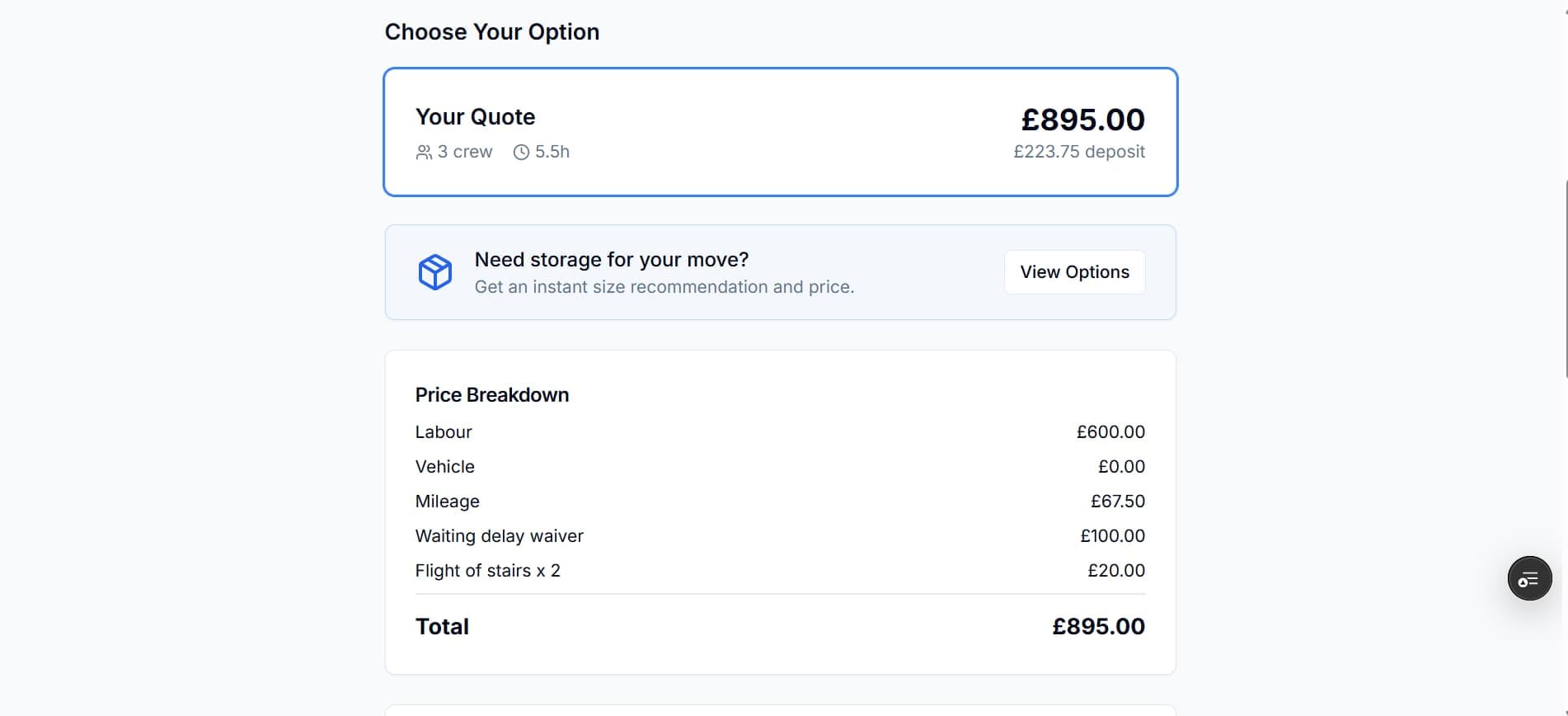
Quote screen
Example: Branded quotes that make next steps clear.
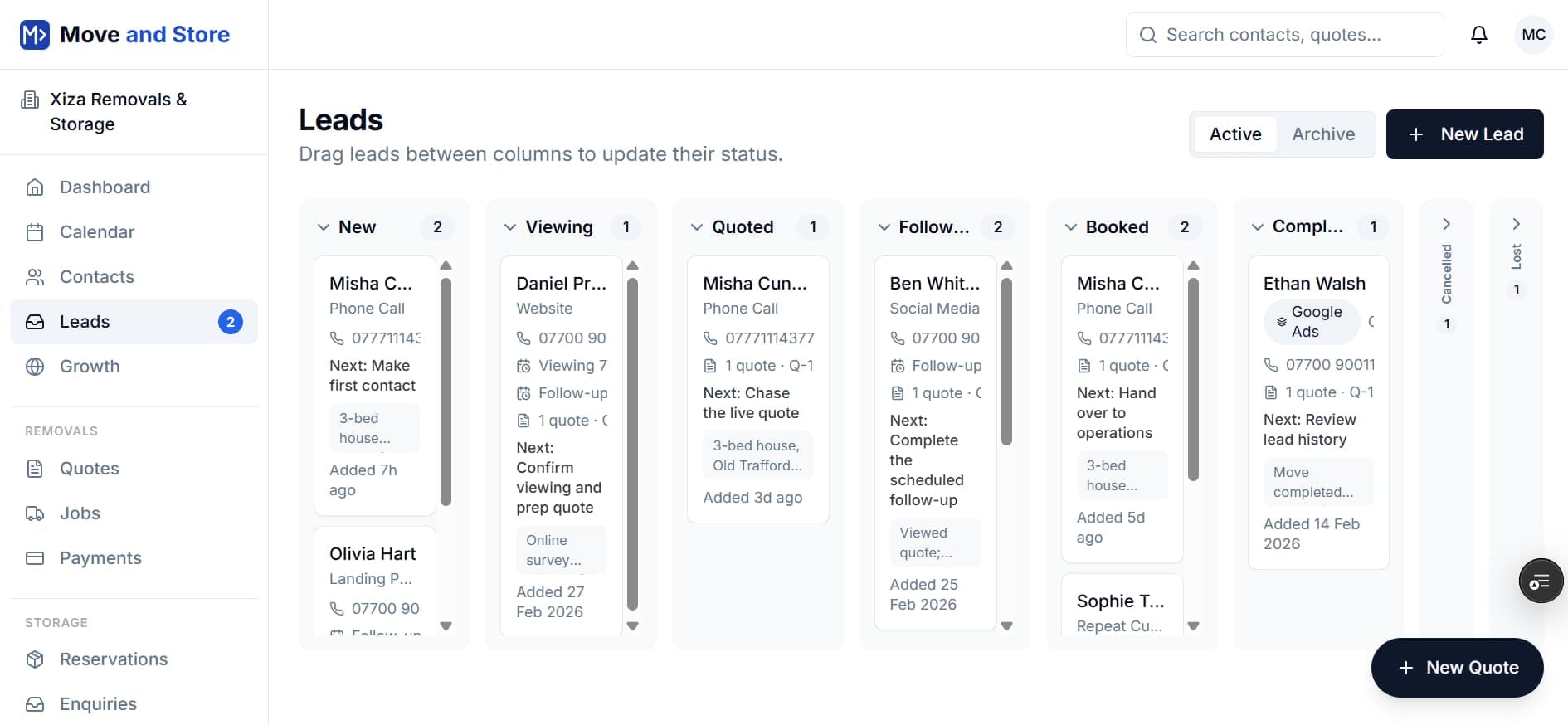
Pipeline and CRM
Example: A pipeline that makes follow-up visible.
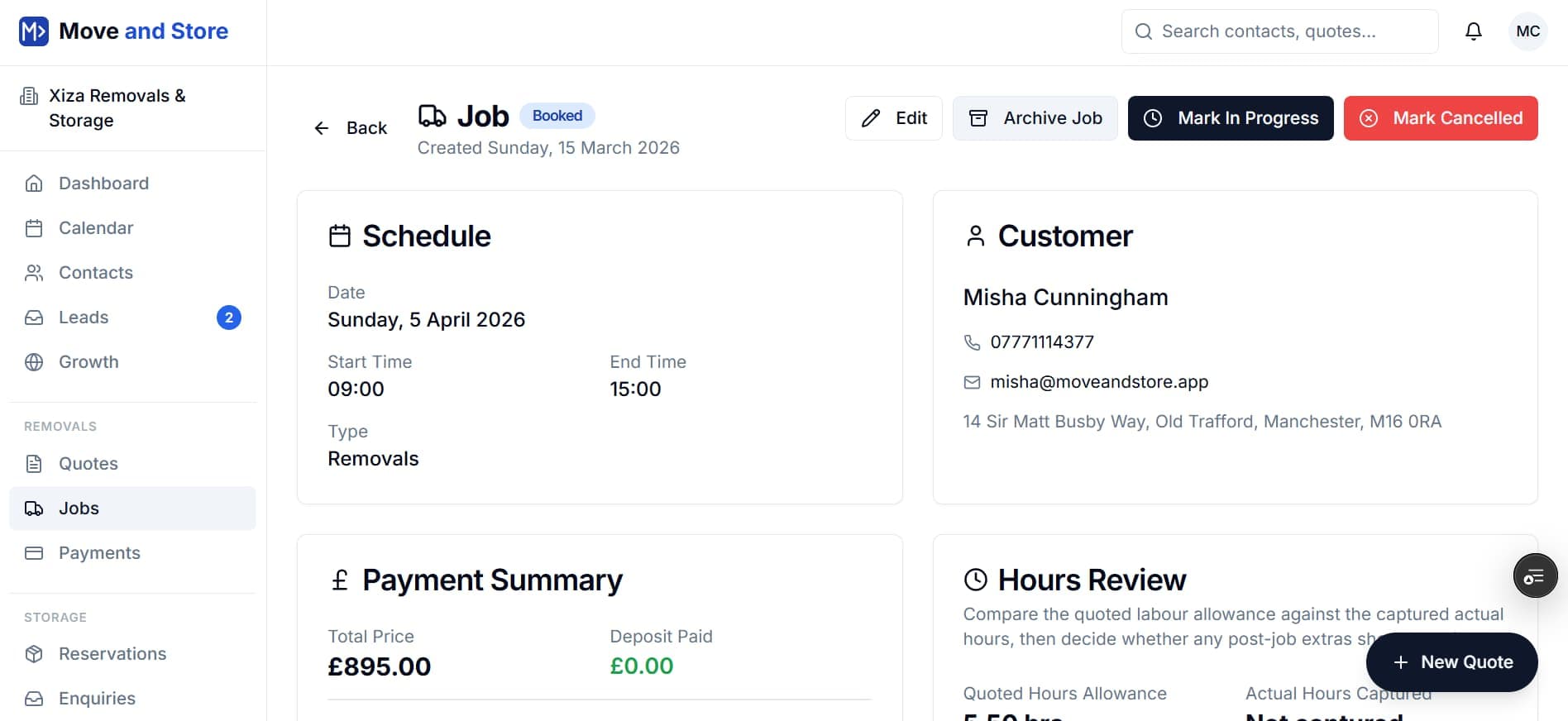
Job view and handover
Example: Job details, schedule and handover in one place.
If the admin is spread across quotes, deposits, and follow-up, Pro fixes it for £29/month.
Move and Store Pro keeps quoting, deposits, CRM follow-up, and job handover inside one joined-up removals workflow so good leads do not leak between tools.
Mistakes to avoid
Most admin problems are not caused by lack of effort. They come from using tools that do not match the workflow.
Don’t rely on memory or WhatsApp. Human memory fails more often than you think; systems don’t.
Don’t treat the quote as the end of the sale. The quote is the start of the conversion.
Don’t use spreadsheets as a long-term ops strategy. Spreadsheets hold data, not workflow.
Specific quote-conversion issue?
If your main problem is customers liking the quote but not committing, read how to make it easier for customers to say yes to your quote.
Transcript
Read or download the full captions
If you would rather skim than watch, the full transcript is right here, along with downloadable caption files.
Hi, I’m Misha Cunningham, founder of Move and Store. If you run a small removals company, you’re probably thinking you’ve already got enough work. But that’s not the point. The problem is the admin: leads living in your phone, quotes sitting in your emails, dates scribbled in your diary, and follow-up depending entirely on memory. You don’t need more work: you need less hassle.
The daily reality is this: when your enquiries are living in your phone and your quotes are scattered everywhere in bits of paper, notebooks, emails and texts, following up on quotes and customers ends up relying on memory. That’s fine for a while, and we’ve got clients from Move and Store who have been in business for 20 or 30-plus years. But over time it becomes expensive, because good enquiries start to slip through the cracks and are lost to competitors. Admin drags you away from paid jobs, and even one missed detail creates real chaos on move day.
So if you’re in this situation, you might be thinking that actually having work is the problem. But the real issue is the friction that lives between enquiry and booking: time lost formatting quotes, time lost chasing deposits, and time wasted hunting for who said what in WhatsApp. That’s all time you could be doing paid jobs or, better yet, giving yourself a sensible evening.
The better approach is simple: centralise your operations, not just your diary. One single source of truth for every job. That means enquiries, quotes, deposits, diary, and team coordination all living inside the same system, with automated follow-ups so your customers know what’s happening and when, automated deposit requests so you win more jobs while the decision is still warm, and a handover for the crew. If you’re doing it yourself, it’s a couple of clicks and you’ve got a job spec sheet telling you where you’re going and when. That’s professionalism that doesn’t require an IT degree.
Now I’m going to show you one connected process that fixes this: enquiry to quote to deposit to booked job, so you can see how this theory becomes real.
It looks like we’ve got a new lead coming in. We can see the details, where it’s come from, and any notes taken while being on the phone to the lead. If we want, we can schedule a viewing, either in person or online, and send that viewing invitation to the customer. We can also start the quote-creation process in one click.
Step two is all about the inventory. If you sell packing materials or boxes, they can be added into Move and Store, along with the actual items the customer is moving. Step three is about access: where you’re going from, where you’re going to, and anything you need to be aware of in terms of access requirements. Step four is logistics: dates, times, pickup, pricing. Move and Store supports a range of different pricing options, so whatever methodology you use to price, we’ve got you covered. Additional liability cover and extras such as waiting or delay waivers can be configured and added as well.
Once a quote has been created, you have a number of different options. If you’re in person, you can show it to the customer there and then and try to secure the deposit on the spot. You can send it by email as well, and even pencil it into the diary if you’ve got a firm indication that it’s going to go ahead and you want to plan ahead for capacity.
Let’s see what your customer would see. Notice the professional branding. Of course this would be your logo, your company name, your phone number, but your quote is delivered the same way each and every time: all the required details, collection and delivery addresses, clear pricing, and, if storage is part of your service, the ability to include storage in the same quote as well. Your customer sees a clear breakdown of all the options discussed and the quotation they have, including any notes they may have given you. That level of professionalism shows the customer they can rely on you. You can also state any cancellation policies, service terms, or liability cover that apply to your business.
This is the part where most removals companies actually lose the work. They send a quote, cross their fingers, and hope the customer says yes. What Move and Store allows you to do is open up a QR code if you’re in person, get the customer to scan it, open a checkout, and pay directly on the spot. Or, if the quote is sent to them, they can open it on their device and check out while the decision is still fresh.
Once payment has been taken, Move and Store automatically creates a booked job. You can see all of the information such as schedule, customer details, payment information, any money paid, any outstanding balance, and the quoted hours. You can also capture the real hours. If you go over for whatever reason, such as scope creep or waiting around for keys, you can bill for that and add it onto the quotation, while keeping the customer in the loop so they know exactly where the extra charge is coming from. A couple of clicks also gives you or your team a job spec sheet without all the financials, so you know where you’re going, when, and what’s involved.
The point is that smaller operators don’t need a 50-feature monster. What you need is a system that speeds up quoting, tracks leads, collects deposits, and keeps the entire team aligned. That’s how you win more booked jobs with less evening admin.
What you'll actually use every day
Branded quotes that convert
Room-by-room inventory, clear pricing, optional extras, and a customer portal. Your customer sees a proper quote, not a WhatsApp message.
Learn moreDeposit collection built in
Attach a deposit to every quote so the customer can commit online. No more chasing bank transfers or forgetting who owes what.
Learn moreOne pipeline for leads and bookings
Every enquiry tracked, every follow-up scheduled, every quote linked to the customer. Nothing falls between the cracks.
Learn moreCalendar and job management
Booked jobs appear in a shared calendar with crew assignment, job notes, and access details. The team knows what they need before they arrive.
Learn moreBuilt for the way you actually operate
Each page matches a specific type of removals work so you jump straight to the features that matter for your operation. We support UK removals operators, including Manchester.
Specialist guide
Man and Van
Free quoting, booking, and payment software built for man and van businesses. Send professional quotes, collect deposits online, and grow your reputation with automated Google Reviews.
Open this pageSpecialist guide
Self-Storage Operators
Free self-storage management software with unit tracking, occupancy monitoring, and automated billing. Built for UK storage operators who want to ditch the spreadsheets.
Open this pageSpecialist guide
Student Removals
Free quoting and booking software for student removals operators. Handle seasonal demand spikes, smaller moves, and online payments that students expect.
Open this pageSpecialist guide
Office Removals
Free quoting and CRM software for office and commercial removals operators. Professional proposals, online payments, and job tracking for business-to-business moves.
Open this pageLocal software pages for high-value UK markets
Find guides written for operators in your city, with local context on the removals market near you.
City page
London
Greater London
Free removals and storage management software for London-based operators. Professional quoting, online payments, and self-storage tracking built for the capital's busiest market.
Open this pageCity page
Manchester
Greater Manchester
Free removals and self-storage software for Manchester operators. Quoting, payments and storage tracking for businesses across the North West.
Open this pageCity page
Birmingham
West Midlands
Free removals and self-storage management software for Birmingham operators. Professional quoting and storage management for the West Midlands.
Open this pageCity page
Leeds
West Yorkshire
Free removals and self-storage management software for Leeds operators. Quoting, CRM, and storage tracking for Yorkshire's largest city.
Open this pageCity page
Liverpool
Merseyside
Free removals and self-storage management software for Liverpool operators. Quoting, payments, and CRM for Merseyside removals businesses.
Open this pageCity page
Bristol
Bristol
Free removals and self-storage management software for Bristol operators. Professional quoting and storage management for the South West.
Open this pageCity page
Glasgow
Glasgow
Free removals and self-storage management software for Glasgow operators. Quoting, payments, and CRM for Scotland's largest city.
Open this pageCity page
Edinburgh
City of Edinburgh
Free removals and self-storage management software for Edinburgh operators. Professional quoting and storage management for Scotland's capital.
Open this pageMore supported cities
“It has genuinely transformed the way we interact with our clients and reduced the amount of paperwork and manual admin.”
Verified five-star Trustpilot review, 13 March 2026
Long read? Send it to yourself to finish later.
Free access, no card required.
Pro is £29/month.
Quoting, deposits, CRM, and job handover in one system.
Frequently asked questions
- Who is Move and Store for?
- Small UK removals operators and owner-managed teams who want to look more professional and reduce admin without complex enterprise systems.
- Can I take deposits with Move and Store?
- Yes. The platform includes a deposit and payments flow so customers can commit online when they receive a quote.
- Is there a free trial or demo?
- Yes. Start on the free plan to explore the system yourself.
- Do I need an IT team to set this up?
- No. Move and Store is designed for operators, not IT departments. You can be quoting within five minutes of signing up.
Ready to run the full removals workflow from one system?
Start Pro if you want the full workflow live now, or start free and prove it in your own business before upgrading.